Skip to content
Employee Experience

Customers shouldn’t feel seams between your teams.

Webex Calling, Meetings, and Messaging working as one connected layer, in sync with your contact center, CRM, and AI workflows.

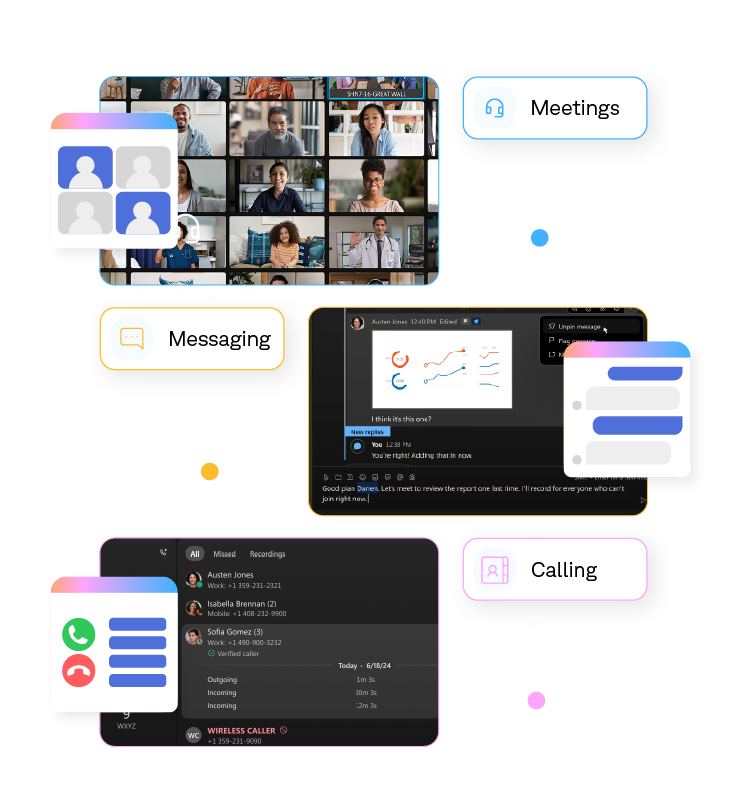
Diagram showing contact center collaboration tools: a video meeting screen, a messaging chat interface, and a phone calling log.

Much more than internal comms.

When an issue requires cross-team work, collaboration tools become part of the service experience itself. Looping a back-office team into a case that needs more hands. Pulling experts into a meeting to unblock an escalation. The speed and clarity of those handoffs shapes how long the customer waits—and how many times they have to start over.

This is the connective tissue that decides whether service feels dialed-in or disjointed.

One AI-enabled ecosystem for seamless collaboration.

We work with the full Webex collaboration suite, designed and deployed so calling, meetings, and messaging operate as one.

#01

Webex Calling

Cloud calling (UCaaS), with AI noise removal, voice optimization, and call summaries built in. It carries clear conversations during live service, whether the person on the other end is a customer, colleague, or external partner.

#02

Webex Messaging

Persistent team messaging where context is preserved across conversations and channels. AI summaries, translation, and context carryover help agents and experts collaborate without losing track of case status.

#03

Webex Meetings

Secure meetings with AI transcription, summarization, and action capture. Best when issues need deeper collaboration or escalation, with a reliable record of what was discussed and decided.

Connected to the rest of your customer service environment by design.

Build a service environment where information moves cleanly between agents, supervisors, experts, and back-office teams, and the customer doesn't pay for the seams.

When a case moves from a Webex Connect bot to a Webex Contact Center call, and into a Webex meeting with a back-office specialist, the CRM record and conversation history are visible to whoever picks it up. The customer stops having to start over when the channel changes, and the agent stops opening five tabs to figure out what's already happened.

Webex transcripts, summaries, and action capture connect to what's happening elsewhere in the stack. A voice transcript from a call can land directly in the CRM case record. A meeting summary can flow to the back-office team that needs to act on it. Turns isolated AI outputs into something the team can rely on, instead of features that still need manual stitching to be useful.

Connect service presence across messaging and meetings to routing, so a customer call lands with someone who can actually help on the first try. Configure recording and data residency to meet your industry's audit requirements. And when the operation changes, whether that's a new channel going or compliance rule, adapt the integration to keep things running smoothly.

Frequently asked questions

Contact center collaboration tools connect agents with the experts and teams they need to resolve customer issues. When calling, messaging, meetings, and customer service systems work together, teams can share context more easily and keep service moving without unnecessary handoffs.

Webex brings calling, meetings, and messaging into one connected collaboration environment. We help integrate those capabilities with your contact center, CRM, and AI workflows so information moves more cleanly between agents, supervisors, experts, and back-office teams.

Yes. We connect Webex collaboration with the wider customer service environment so customer context and conversation history can stay available as interactions move between teams, channels, and systems.

Customers feel it when teams aren’t connected. Better collaboration helps agents bring in the right expertise while preserving customer and case context, reducing the need for customers to repeat information as an issue moves between people or channels.

Webex includes AI capabilities across calling, messaging, and meetings, including summaries, transcription, translation, and action capture. Connecting those outputs to the wider customer service environment can make information more useful to the teams that need to act on it.

Yes. When an issue requires support outside the contact center, connected collaboration tools can help agents bring experts or back-office teams into the process while keeping relevant context available. That creates clearer handoffs and helps the wider service operation work together.

Get a read on your current collaboration suite.

Let’s start with what you've already built and see where it can do more.